Borrower Portal for Real Estate Investors | Capital Kings LLC
Borrower Portal Real Estate Investors

Your Loan, From Term Sheet to Funded, in One Place

Apply once and get a term sheet on the spot. Then upload your documents, sign in the browser, watch every closing condition clear, and talk to Micah directly. Free with every application.

No credit pull to get terms · No application fee · Every fee on the sheet, including ours · Business purpose loans only

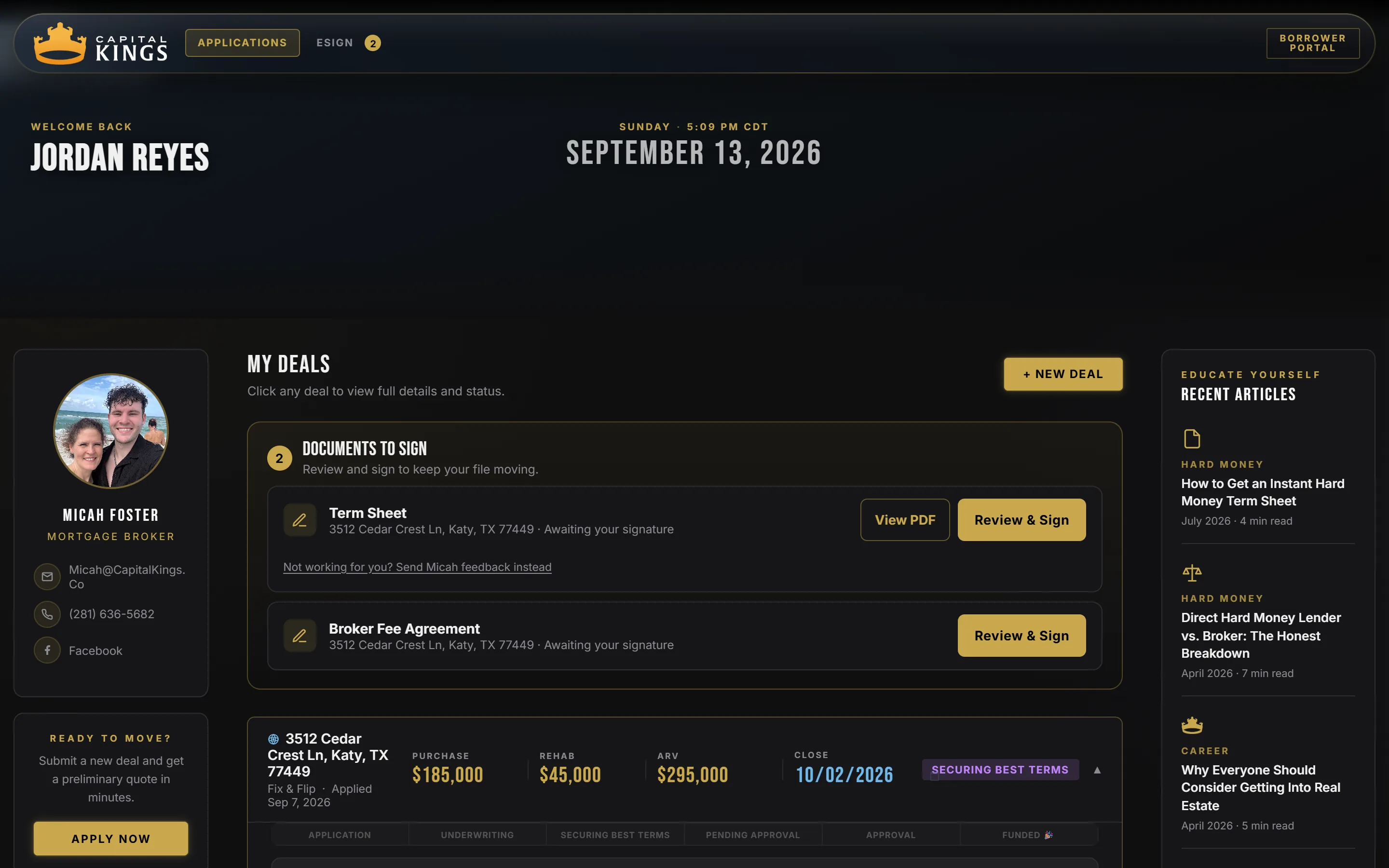
The Capital Kings borrower portal dashboard for a sample deal: a welcome header, two documents waiting for signature (term sheet and broker fee agreement), the deal card for 3512 Cedar Crest Ln with purchase price, rehab budget, ARV, close date and a Securing Best Terms status, Micah's contact card on the left, and recent articles on the right.
This is what you log into. Sample deal. Every deal you ever bring us lives under the same login.
60
Seconds to a Term Sheet
400+
Lenders Shopped
72 Hrs
Fastest Close
$0
To Use the Portal
How It Works

Application to Funded, Without the Phone Tag

Most hard money lenders run your loan out of an inbox. You email documents into the void, then call to ask what is missing. The portal replaces that with one screen that always shows where the loan stands and whose court it is in.

01

Apply in a few minutes

Address, purchase price, rehab budget, ARV, a little about you. No credit pull. Your portal account is created from the application with a four digit PIN.

02

Get the term sheet on the spot

A branded term sheet renders while you watch: loan amount, rate, every closing cost with who it goes to, cash to close, proof of funds. It saves to your portal.

03

Sign in the browser

Review the term sheet and the broker fee agreement and sign both from the eSign tab. No printer, no third-party signing account.

04

Upload your documents

Six categories, drag and drop from anywhere on the page. Each one shows needed, under review or approved, so you never resend something Micah already has.

05

Watch the conditions clear

Appraisal, insurance, title, lender approval. Every condition shows its status, its due date and who it is waiting on: you, the lender, title or Capital Kings.

06

Fund, then do it again

Your ID, entity documents and bank statements carry over to the next deal. The second application takes a fraction of the time the first one did.

Feature 01 · Instant Term Sheet

Real Terms Before You Talk to Anyone

The application ends with a term sheet, not a "we will be in touch." It prices your deal off the same shelf we shop to lenders: loan amount, rate, origination, the full fee stack, total cash to close and the proof of funds the lender will want to see in your account.

Every line carries a chip that says who the money goes to. Lender, appraiser, title company, insurer. The broker fee is on there too, from the first draft, because it is the only money Capital Kings earns and you should see it before anyone asks you to sign.

It is preliminary until a lender approves the file, and it says so on the sheet. But it is the same math, so the number rarely moves much.

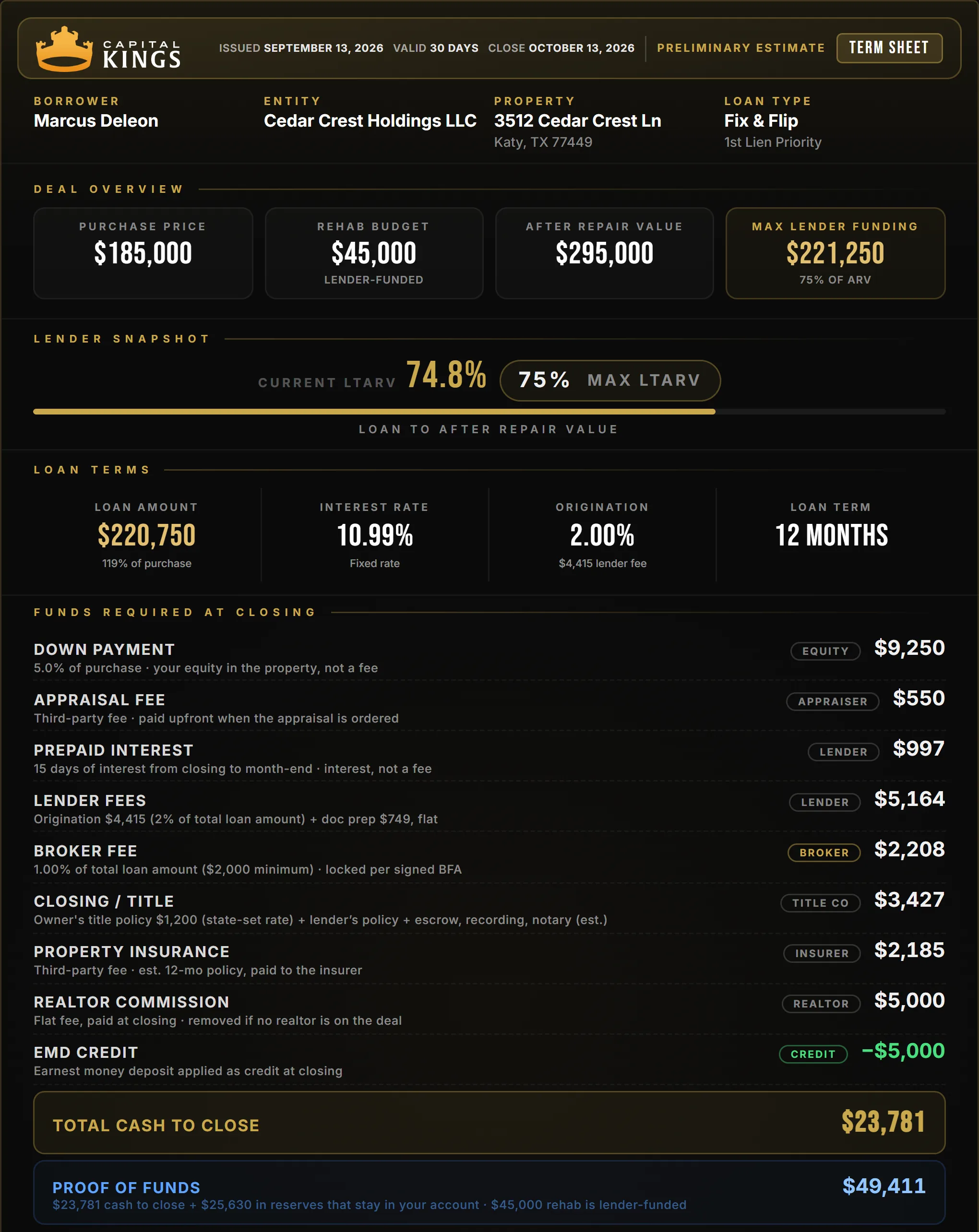
A Capital Kings instant term sheet for a sample Katy Texas fix and flip: purchase price, rehab budget, after repair value, a 74.8 percent loan to ARV bar, loan terms at 10.99 percent with 2 percent origination and a 12 month term, the itemized funds required at closing with payee chips, total cash to close and proof of funds.
A real sheet out of the portal, sample deal. Every fee itemized, cash to close at the bottom.
Feature 02 · Deal Status

Always Know Where Your Loan Stands

Each deal is a card. The top line is the deal itself: purchase, rehab, ARV, target close. Under it, a six stage pipeline from Application Received through Funded, and a "where things stand" note that says what happened, when, and what is next.

When Micah moves the file, the card moves with it. No status call required. If something needs you, it says so in plain words at the top of the card.

Open the card and the tabs take you to your documents, the conditions checklist and the full deal analysis for that property.

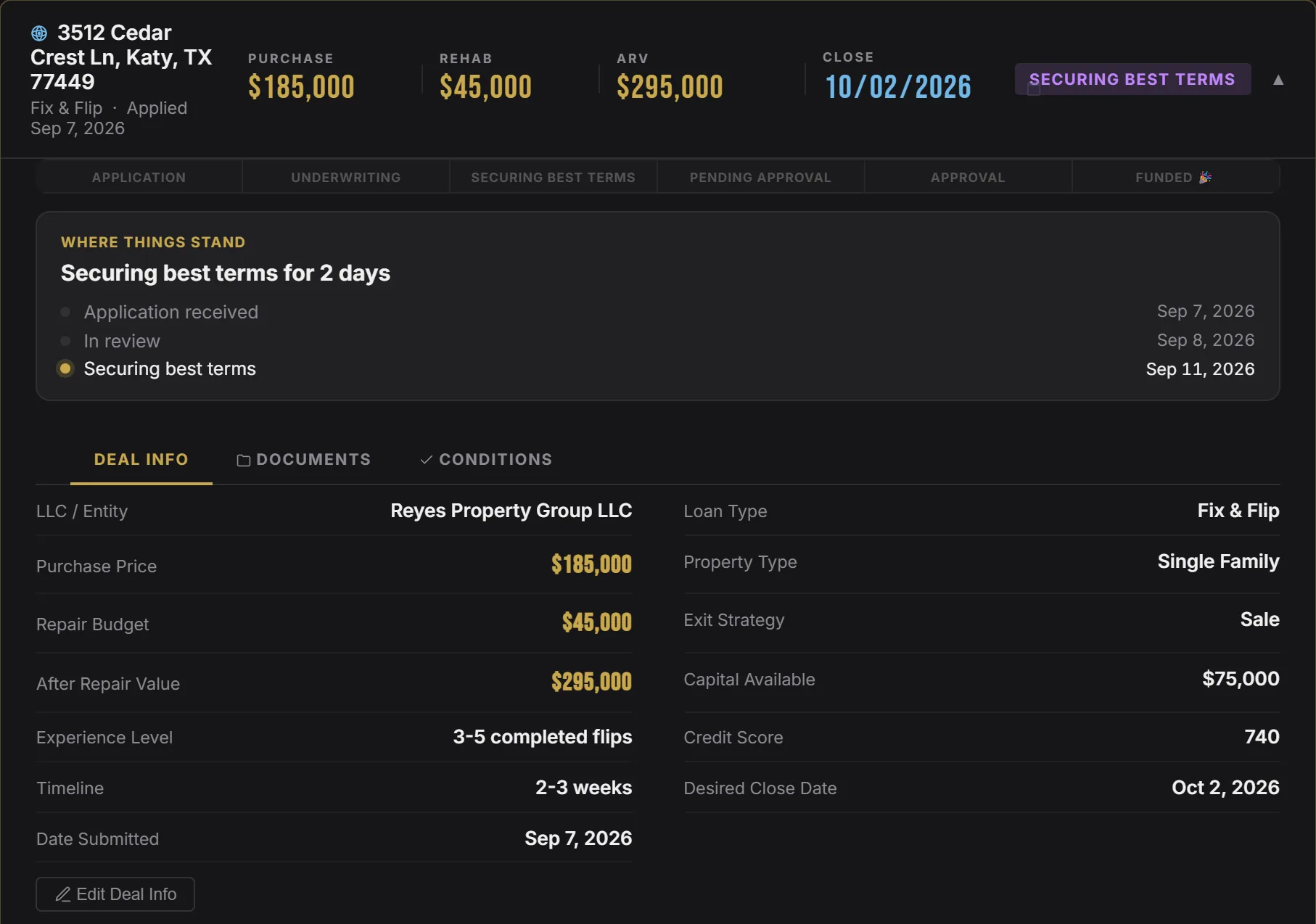
A borrower deal card in the Capital Kings portal: the property address, purchase price, rehab budget, ARV and close date, a six stage pipeline strip, a where things stand panel listing application received, in review and securing best terms with dates, and Deal Info rows for entity, loan type, exit strategy, capital available, credit score and desired close date.
The deal card, sample deal, opened to Deal Info.
Feature 03 · Documents

Upload Once. Never Resend.

Six categories cover everything a hard money lender asks for: property contract, rehab budget, bank statements, government ID, LLC documents and a catch-all for the rest. Drag a file anywhere on the page and it lands in the right slot.

Each category has three states. Needed, under review, approved. The ring at the top counts what is done, the gold button always points at the next thing to upload, and if something bounces back you see the reason next to it instead of finding out in an email three days later.

Your ID, entity documents and bank statements are yours, not the deal's. They carry to the next property automatically.

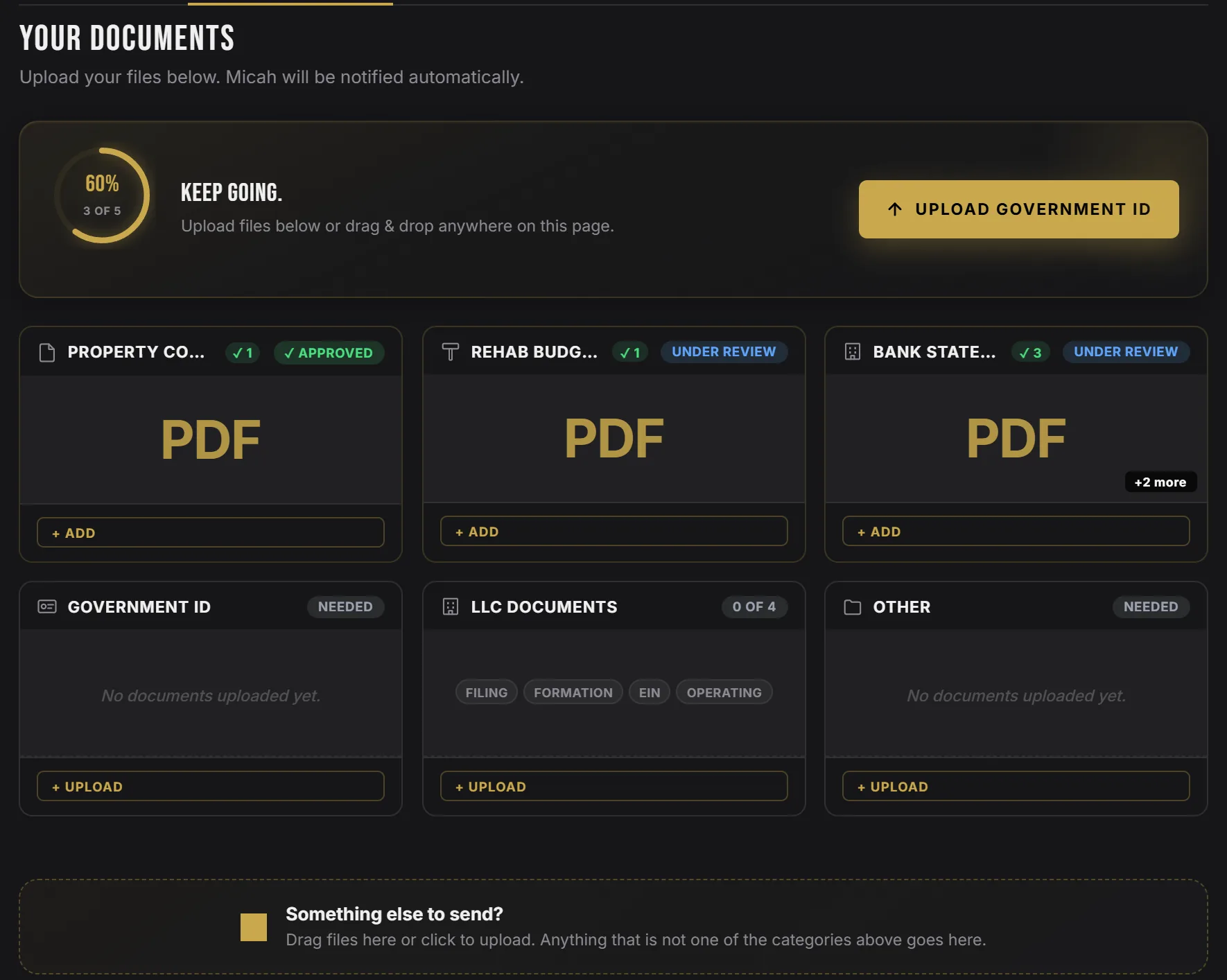
The Documents tab of the Capital Kings borrower portal showing a 60 percent progress ring reading 3 of 5, an Upload Government ID button, and six category cards: property contract approved, rehab budget under review, bank statements under review with three files, government ID needed, LLC documents 0 of 4, and other.
Documents tab, sample deal. Three states, one ring, one next step.
Feature 04 · eSign

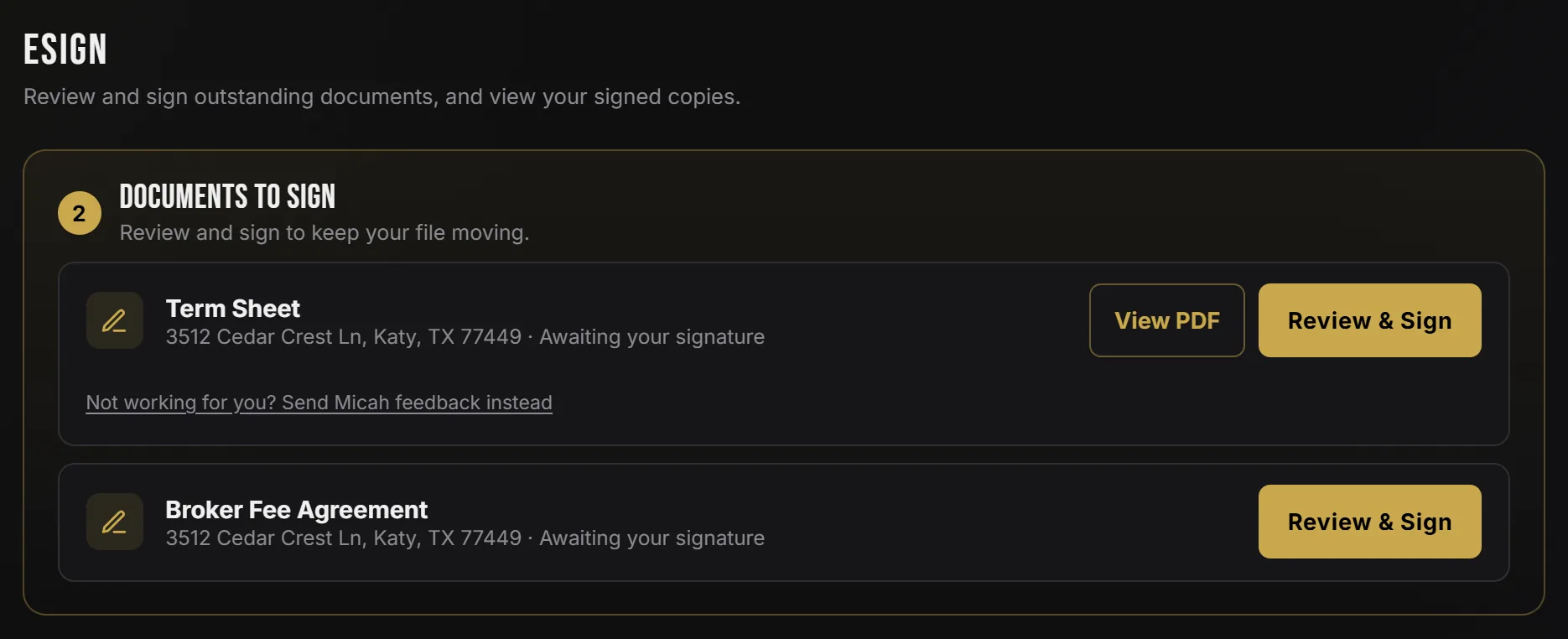
Sign Your Term Sheet in the Browser

The term sheet and the broker fee agreement wait for you in the eSign tab, and on your home screen, the moment they are ready. Review the PDF, sign with your finger or mouse, done. The signed copy stays in the portal next to the deal.

If the terms are revised later, the sheet you actually signed never disappears. It stays as its own read-only row, and the new version shows up next to it for signature.

Not comfortable with a number on the sheet? There is a feedback link under it that goes straight to Micah instead of a signature.

The eSign tab of the Capital Kings borrower portal listing two documents to sign for a sample deal: the term sheet with View PDF and Review and Sign buttons, and the broker fee agreement with a Review and Sign button.
Two documents waiting. Both signed without leaving the page.
Feature 05 · Closing Conditions

Always Know What the Holdup Is

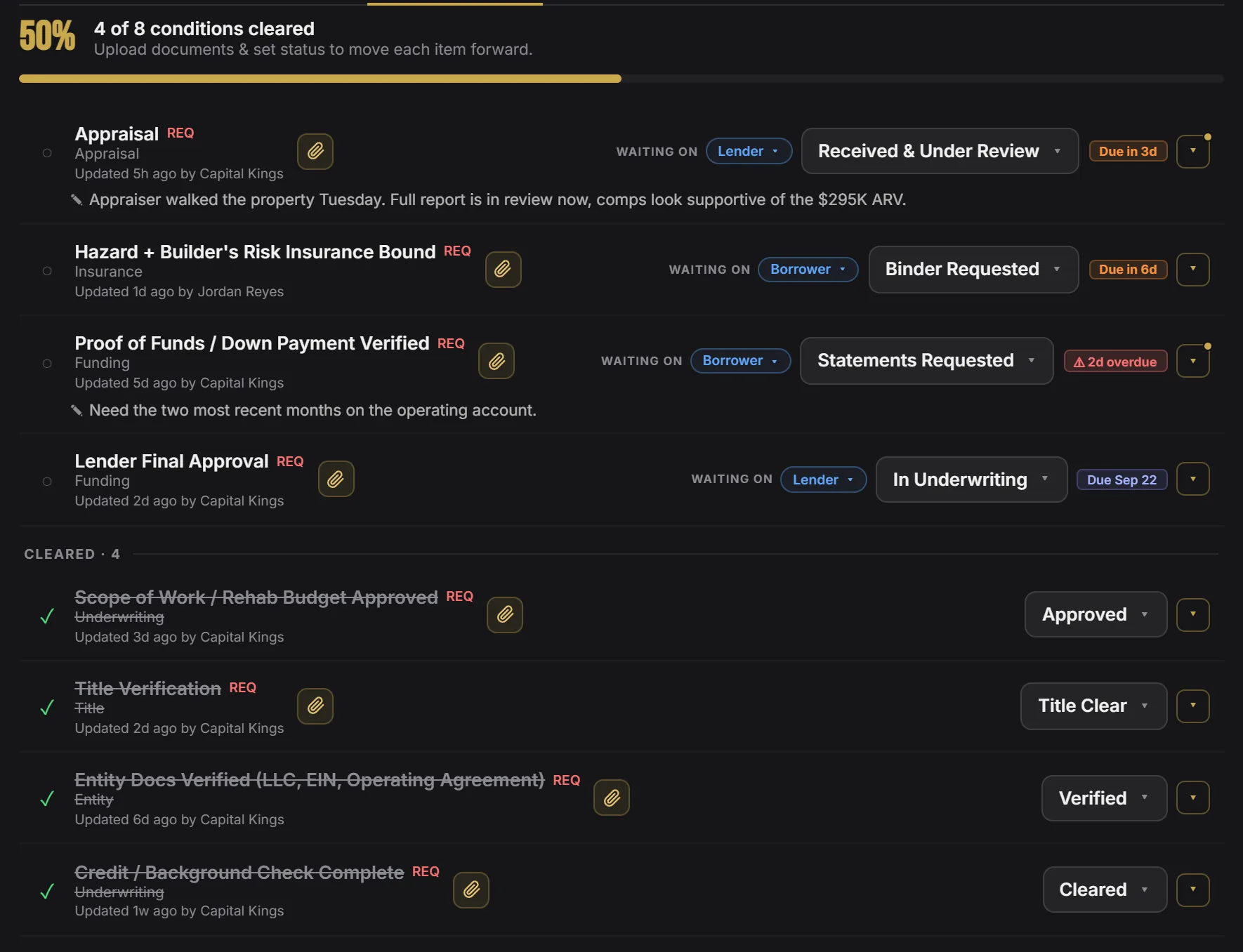
After the term sheet, a loan is a checklist. Appraisal, insurance binder, proof of funds, title, entity documents, lender final approval. The Conditions tab shows every one with its status, its due date, the documents attached to it and who it is waiting on.

You can see the appraisal is back and under review, the insurance binder is due in six days, and the bank statements are two days overdue and waiting on you. So you go push the one thing that actually moves the closing.

Cleared items drop to the bottom with a check. The bar at the top is the whole loan in one number.

The Conditions tab of the Capital Kings borrower portal for a sample deal: 4 of 8 conditions cleared at 50 percent, open items for appraisal, hazard and builder's risk insurance, proof of funds and lender final approval, each with a waiting-on chip, a status and a due date, and four cleared conditions below.
Sample deal checklist. Whose court it is in, on every line.
Feature 06 · Deal Analyzer

The Underwriting, Shown to You

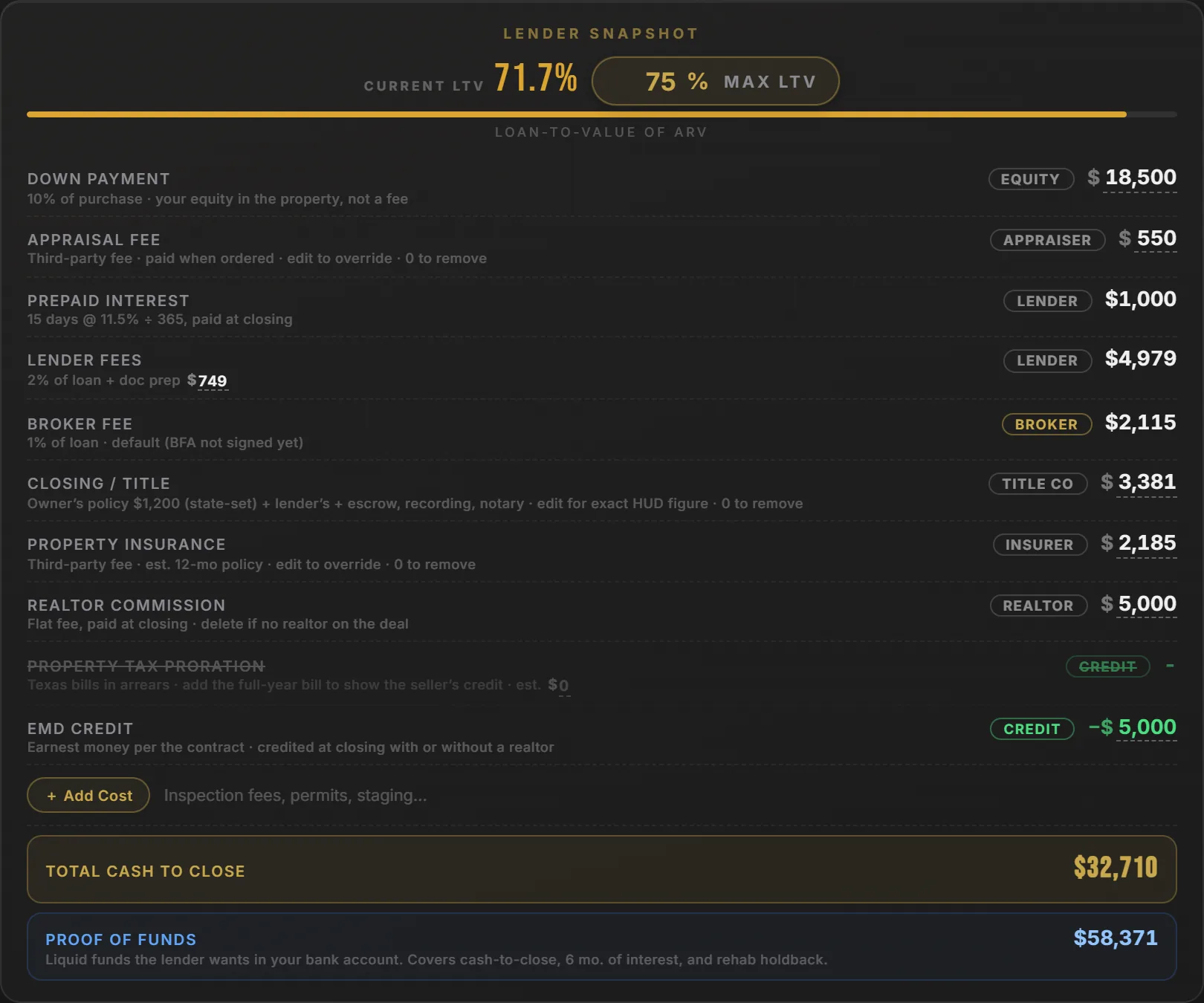
Every deal card carries the full Deal Analyzer, pre-filled from your application. Change the purchase price, the rate, the down payment or the rehab number and the whole thing recalculates: lender snapshot, monthly payment, net profit, ROI and cash to close.

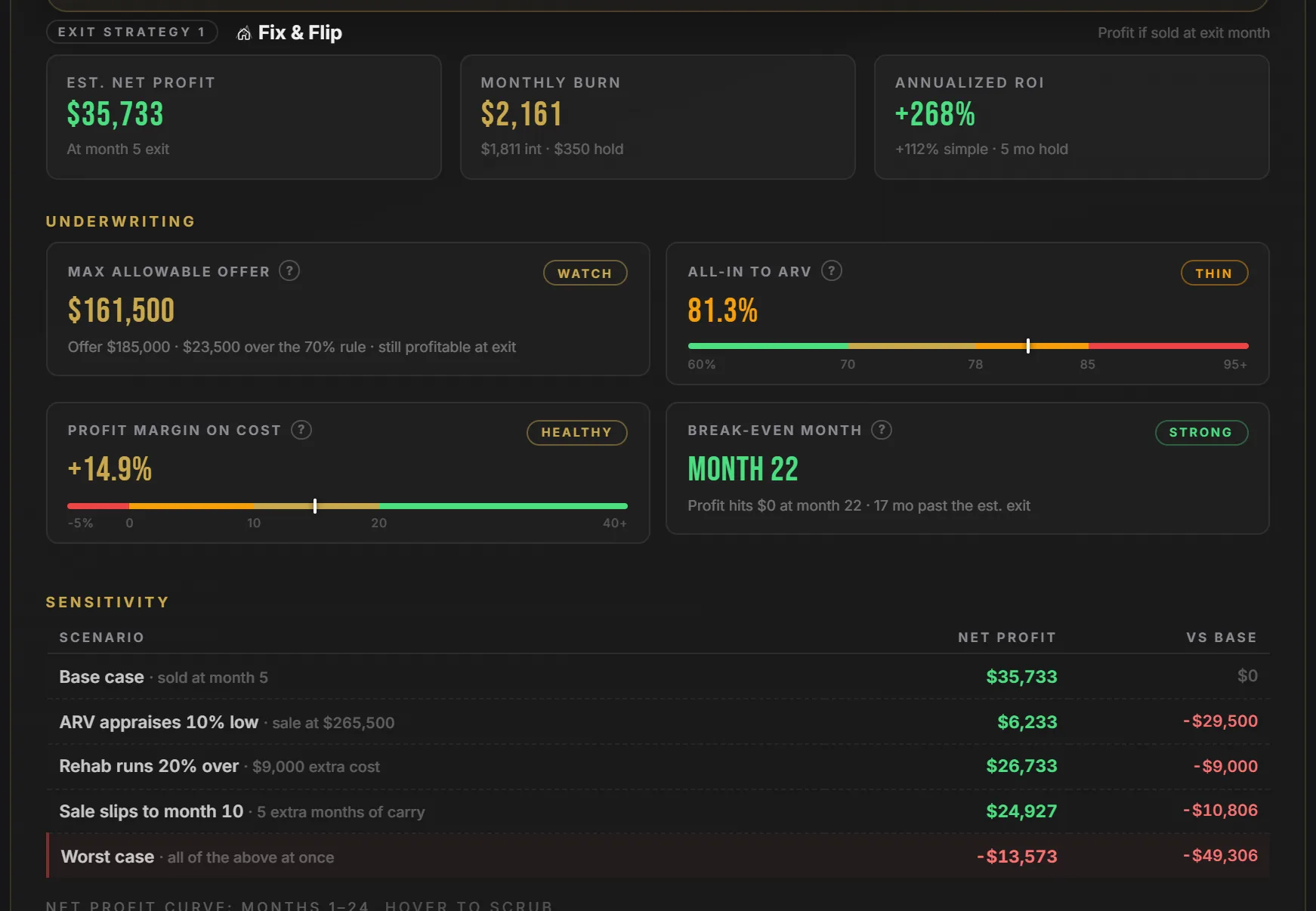
Then it runs the meters a lender runs. Maximum allowable offer, all-in to ARV, profit margin on cost, break-even month. Plus a sensitivity table for when the appraisal comes in low, the rehab runs over or the sale slips five months.

Edits save to the deal, and you can download the analysis or a term sheet built from your numbers at any time.

The lender snapshot inside a Capital Kings borrower deal: current LTV 71.7 percent against a 75 percent max, then the fee stack with payee chips for down payment, appraisal, prepaid interest, lender fees, broker fee, closing and title, property insurance, realtor commission and EMD credit, total cash to close and proof of funds.
The lender snapshot, sample deal. Edit any number and it reprices.
Underwriting meters in the Capital Kings borrower portal deal analyzer: fix and flip exit cards for estimated net profit, monthly burn and annualized ROI, then maximum allowable offer, all-in to ARV, profit margin on cost and break-even month with health badges, and the start of the sensitivity table.
The same underwriting meters a lender runs. You see them before the lender does.
Feature 07 · Micah's Valuation

An Appraiser's View, Before the Appraisal

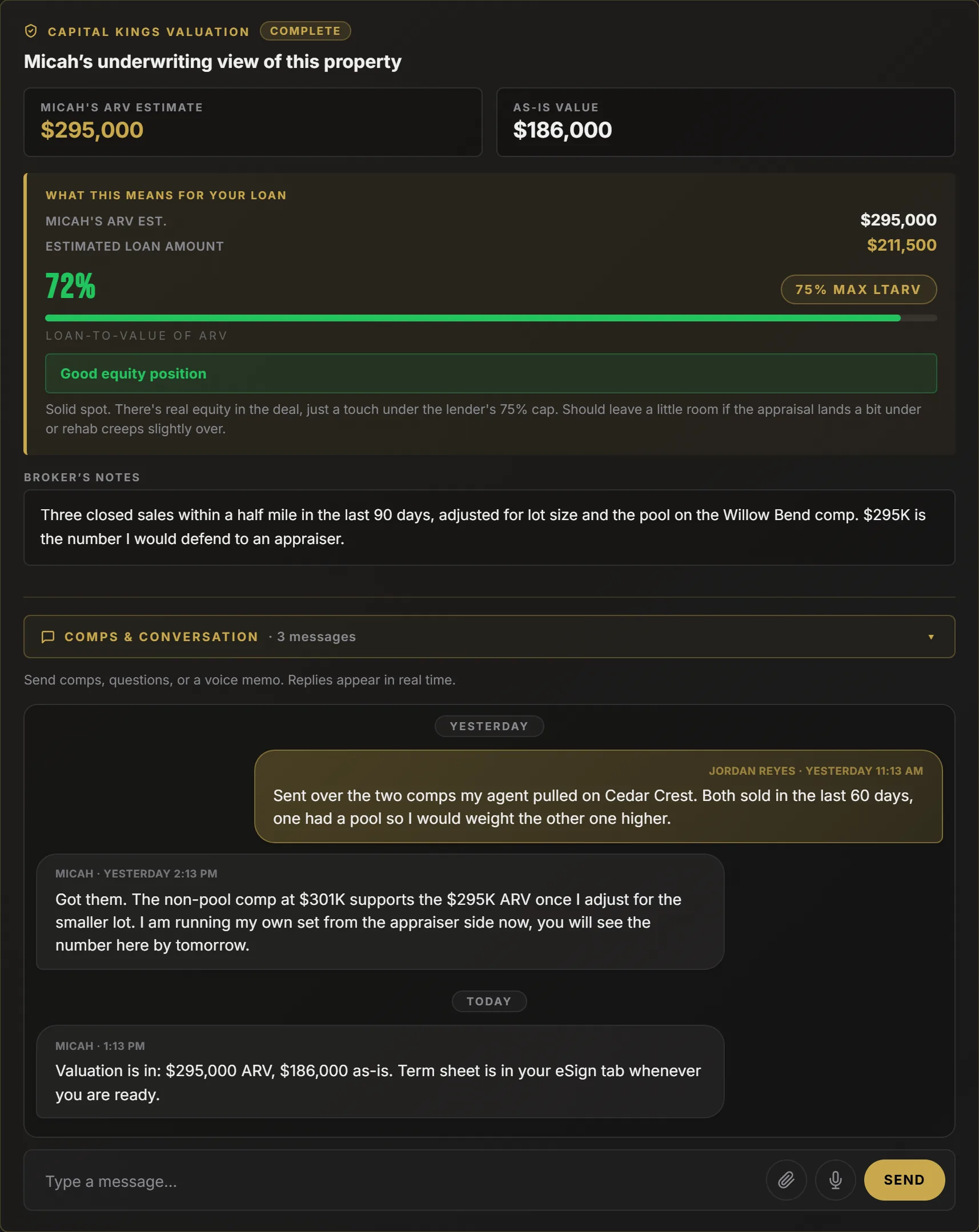
Before the lender orders an appraisal, Micah runs comps on the property from an appraiser's perspective and posts the result on your deal: his ARV estimate, the as-is value, and what both mean for your loan, measured against the lender's maximum leverage.

Under it is the Comps and Conversation thread. Send your own comps, a PDF, a question or a voice memo from your phone. Replies land in the same thread, in real time, on the deal they are about, instead of in a text chain you will never find again.

The Capital Kings Valuation card on a sample borrower deal: Micah's ARV estimate of $295,000, as-is value of $186,000, a what this means for your loan panel showing 72 percent loan to ARV against a 75 percent maximum with a good equity position note, broker's notes, and the Comps and Conversation thread with three messages.
Valuation card and thread, sample deal.
Feature 08 · Capital Kings Intelligence

Property Data on the Address You Applied With

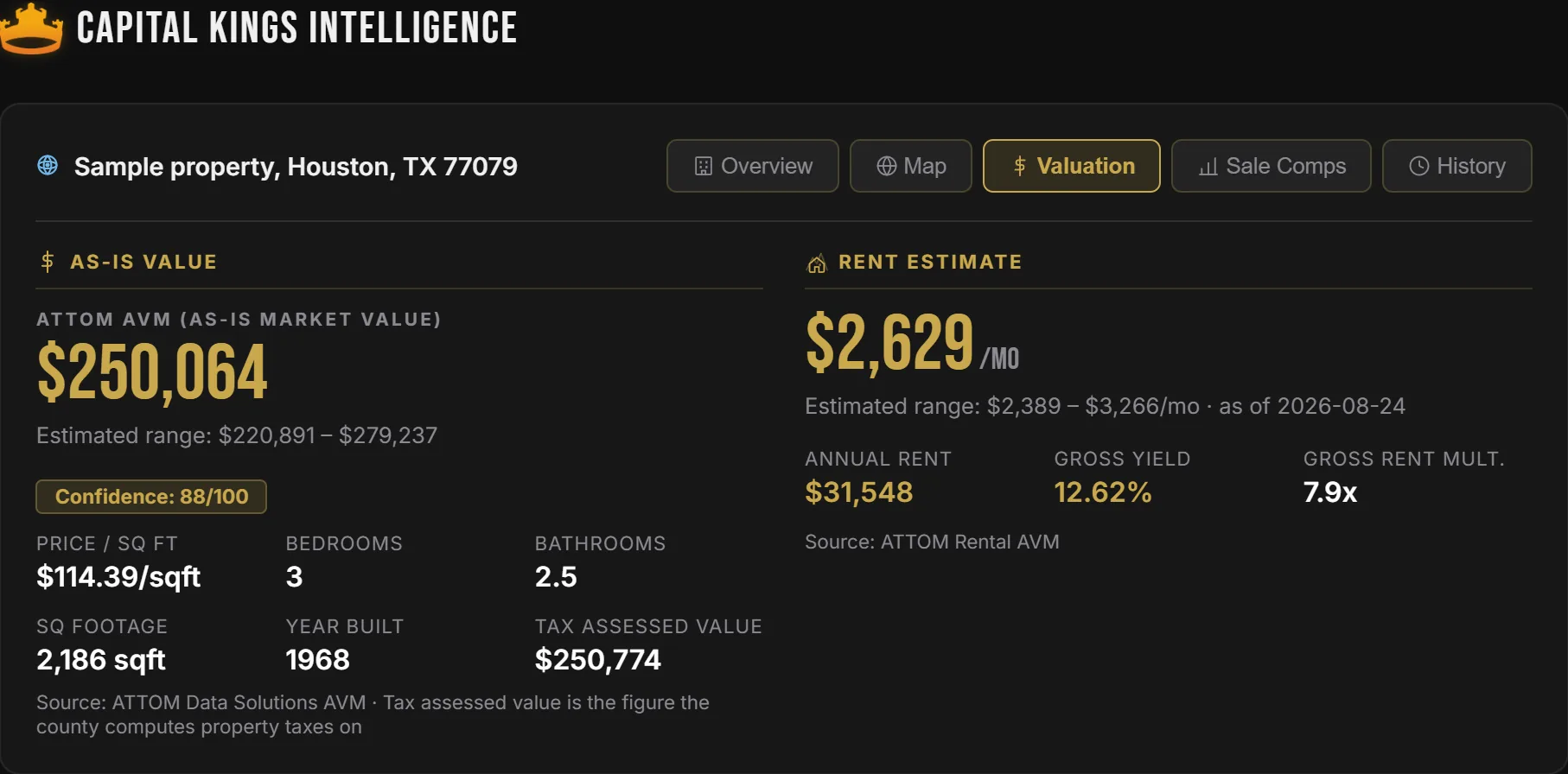
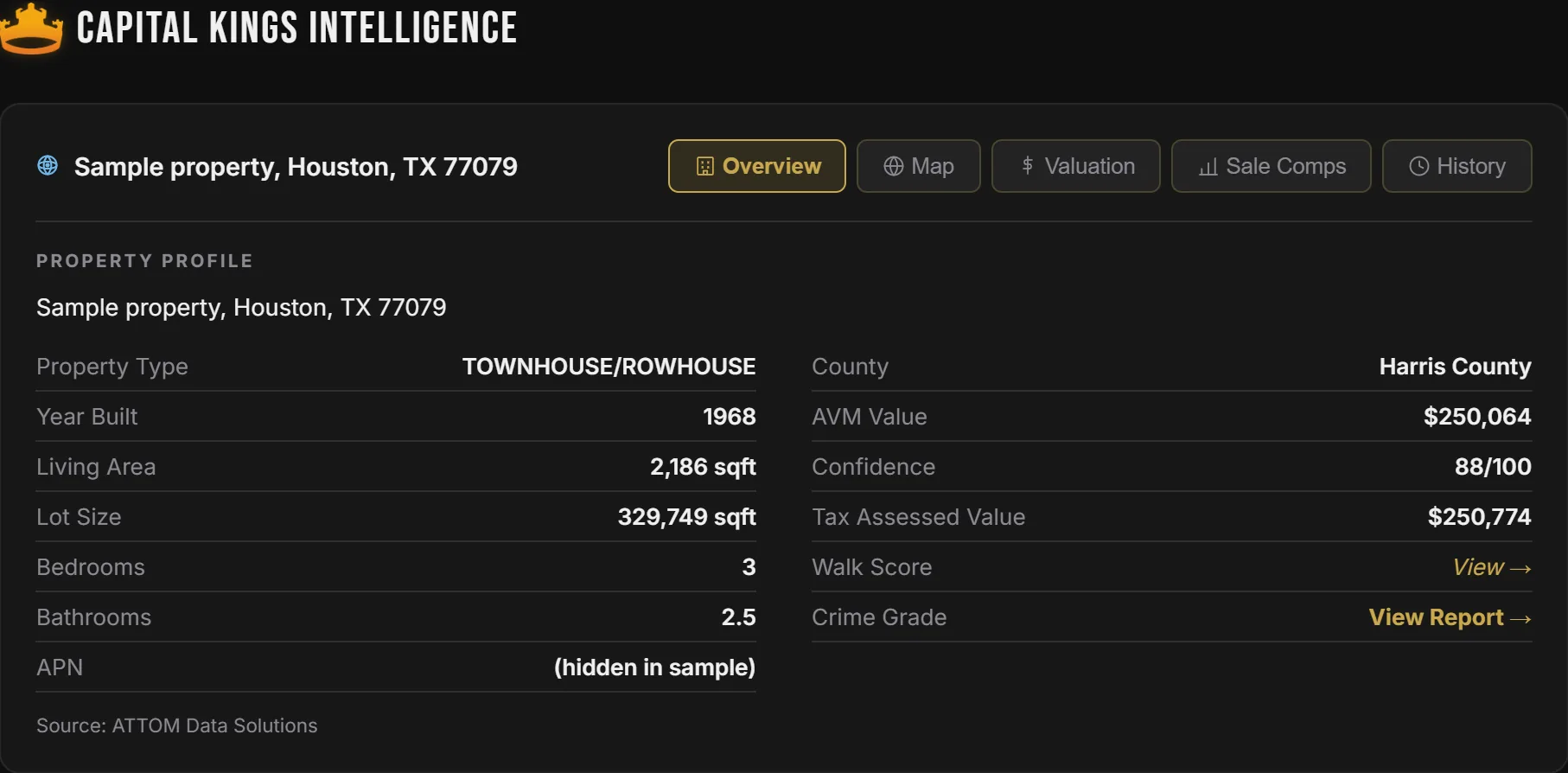
The moment a deal is on file, the portal pulls the public record on the property: an automated value with its confidence score, a rent estimate with gross yield, beds, baths, square footage, year built and tax assessed value, plus a map, recent sale comps and the ownership history.

It is the same research Micah runs on his side, so when the two of you talk about value you are looking at the same screen. Useful before you write the offer, and useful again when the appraisal comes back.

The Capital Kings Intelligence valuation tab for a sample Houston property: an ATTOM automated as-is value of $250,064 with an estimated range and 88 out of 100 confidence, price per square foot, bedrooms, bathrooms, square footage, year built and tax assessed value, beside a rent estimate of $2,629 a month with annual rent, gross yield and gross rent multiplier.
Valuation tab, sample property. Value, rent and confidence on one screen.
The Capital Kings Intelligence overview tab for a sample property, with Overview, Map, Valuation, Sale Comps and History tabs, and a property profile listing property type, year built, living area, lot size, bedrooms, bathrooms, county, AVM value, confidence, tax assessed value, walk score and crime grade.
Overview, map, valuation, sale comps and history. All on the address you applied with.
Feature 09 · On Your Phone

Built for the Driveway, Not the Desk

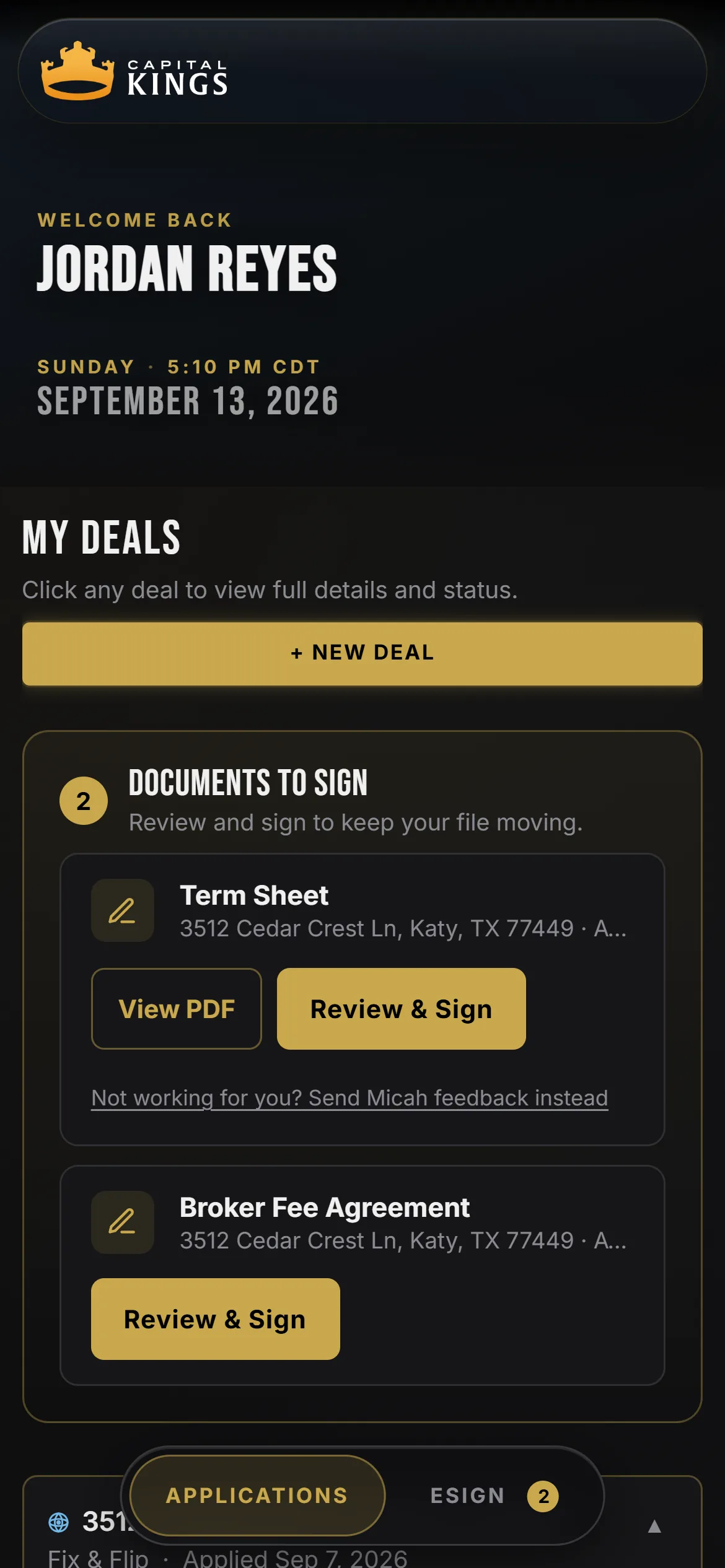
Most of this happens on a phone. You are at the property, the title company just texted, and the lender wants the insurance binder. The portal is the same app at any size: sign a term sheet, snap a photo of a document and upload it, check a condition, message Micah, from wherever you are.

Add it to your home screen and it opens like an app. Downloads open in your phone's native viewer, so the term sheet PDF is one tap away when a seller asks for proof you are financed.

The Capital Kings borrower portal on a phone: the welcome header, the My Deals heading, a New Deal button, and two documents to sign, the term sheet and the broker fee agreement, each with a Review and Sign button.
The same portal on a phone, sample deal.
Also Included

The Rest of the Portal

All of it comes with the application. There is no upgrade, no paid tier, and nothing to install.

Every deal, one login

Bring us the next property and it shows up as a second card under the same account, with your documents already on file.

Micah on every page

His direct line, email and Facebook page sit in the left rail on every screen. You are never routed through a call center.

Login your way

Email and a four digit PIN, a text message code, or Google. Forgot the PIN? A magic link resets it in one tap.

Pre-approval letters

Need a letter for an offer tonight? Ask Micah and a print-ready pre-approval letter for the amount you qualify for is on its way.

Downloads that work

Term sheet PDF, deal analysis PDF, signed agreements. They open in your phone's native viewer, not a broken download bar.

Investor education

The reading rail on your dashboard keeps the guides that matter for your loan type one tap away: draws, Dutch interest, DSCR, closing checklists.

Your realtor, looped in

If a realtor or wholesaler sent you, they can follow the deal from their own portal. They never see your bank statements or your ID.

Every term sheet, kept

Terms get revised on real deals. The portal keeps each version, including the one you signed, so the paper never disappears out from under you.

Locked down

Documents are stored under your account and readable only by you and Capital Kings. Nothing about your file is public.

Lending Coverage

We Lend Where You Buy

One portal, 37 states. We broker across the country with the deepest roots in Texas investor markets. If your next deal is out of state, it goes under the same login with the same term sheet.

Texas, our home market
Active in 37 states
Not currently available
Tap a gold state to see its local loan programs
Micah Foster, founder of Capital Kings
A Note From Micah

I built this because I was tired of watching good investors lose deals to bad communication. Not bad terms. Bad communication. A missing bank statement nobody mentioned, an appraisal that came back and sat in an inbox for four days.

So everything about your loan is on one screen, and the fee I earn is printed on the term sheet before you sign anything. If the portal makes your loan close faster, it did its job. If it made you feel like a number, text me and tell me where.

Micah Foster · Capital Kings, LLC
What the Portal Prices

The Financing Behind the Screens

The software is only worth something if the loan is. Every term sheet in the portal is priced off the same shelf we shop across our lender network.

Hard Money Rates
From 8.99%
Priced by credit and experience
Purchase Leverage
Up to 90%
Of the contract price
Rehab Funding
100%
Capped at 75% of ARV
Speed to Close
As Fast As 72 Hrs
Once documents are complete
Loan Types
4 Programs
Fix & flip, DSCR, bridge, new build
Term Sheet
Instant
No credit pull to get terms
Questions

Borrower Portal FAQ

Nothing. The instant term sheet, document vault, eSign, conditions checklist, deal analyzer and property data all come with the application. Capital Kings earns one broker fee when a loan closes, and it is printed on the term sheet. There is no software fee, no application fee, and nothing owed if the loan never closes.

No. You get the term sheet at the end of the application, on the spot. The account is created from that application with your email and a four digit PIN, and the term sheet is already saved in it when you log in for the first time.

No. The term sheet prices off the credit score you enter and your experience. A credit report is pulled once, later, when the lender underwrites the file. It appears on your conditions checklist like every other step, so you always know when it happens.

No. It is a preliminary estimate, labeled that way at the top of the sheet. It uses the same pricing we shop to lenders, so the numbers rarely move much, but the loan is real when a lender issues final approval. The conditions tab shows exactly what stands between you and that approval.

Six categories: the executed property contract, your rehab budget or scope of work, two to three months of bank statements, a government ID, your LLC documents (certificate of filing, certificate of formation, EIN letter, operating agreement), and anything else the lender asks for. The portal shows each one as needed, under review or approved, and your ID, entity documents and bank statements carry over to your next deal.

In the browser. The term sheet and the broker fee agreement appear in the eSign tab and on your home screen. Open one, review the PDF, sign with your finger or mouse, and the signed copy is saved to the deal. There is no printing and no third-party signing account to create.

Email and a four digit PIN, a code texted to your phone, or Google. If you forget the PIN, request a magic link from the login screen and it resets in one tap. Everything works on a phone, and you can add the portal to your home screen so it opens like an app.

Yes. Every property you bring us is its own card under the same login, with its own term sheet, documents, conditions and analysis. Use the New Deal button on your dashboard and the second application is faster than the first because your personal and entity documents are already on file.

You and Capital Kings, and the lender underwriting your file when it is time to submit. If a realtor or wholesaler referred you, they can follow the deal's status from their own partner portal, but they never see your bank statements, your ID or your entity documents. Nothing about your file is public.

Get Your Term Sheet

Everything above starts with one application and ends with real numbers on the screen. About five minutes, no credit pull.

Rather talk first? Call or text Micah at (281) 636-5682.